
Console
This is achieved via Keyboard-Video-Mouse (KVM) on the physical machine, the virtual machine, or through Intelligent Platform Management Interface (IPMI) – such as: iDRAC (Dell Servers), iLO (HP Servers), ILOM (Sun -> Oracle Servers), IMM (IBM Servers), CIMC (Cisco UCS Servers).
Throughout your course you will be frequently using this method.
Virtual Network Computing (VNC)
VNC allows you to remotely connect to a Linux machine through GUI. You are not using this method throughout your course. By default it runs over TCP 5900.
Secure Shell (SSH)
SSH is a client-server service model which operates in TCP/IP application layer. It establishes from your host machine (SSH Client) a secure remote CLI connection to your Kali Linux (SSH Server), through a virtual interface, over a network. It runs over TCP 22. This is the recommended method to connect remotely to your Kali Linux. But you need to enable the SSH service (In other word, make it an SSH server).
┌──(kali㉿kali)-[~]
└─$ sudo systemctl start ssh
[sudo] password for kali:kali
When SSH service started successfully, you can check verify if the server listens on TCP port 22.
┌──(kali㉿kali)-[~]
└─$ sudo ss -antlp | grep sshd
LISTEN 0      128          0.0.0.0:22        0.0.0.0:*    users:(("sshd",pid=4459,fd=3))
The command sudo systemctl start ssh runs SSH service; but once we reboot our machine, it is not being run automatically. If you want to have SSH service automatically started at the boot time, issue the following command:
┌──(kali㉿kali)-[~]
└─$ sudo systemctl enable ssh
Synchronizing state of ssh.service with SysV service script with /lib/systemd/systemd-sysv-install.
Executing: /lib/systemd/systemd-sysv-install enable ssh
Created symlink /etc/systemd/system/sshd.service → /lib/systemd/system/ssh.service.
Created symlink /etc/systemd/system/multi-user.target.wants/ssh.service → /lib/systemd/system/ssh.service.
You can use systemctl to enable and disable most services in Kali Linux. To check the status of the SSH service you can use:
┌──(kali㉿kali)-[~]
└─$ sudo systemctl status ssh
● ssh.service - OpenBSD Secure Shell server
     Loaded: loaded (/lib/systemd/system/ssh.service; enabled; vendor preset: disabled)
     Active: active (running) since Sat 2022-04-02 00:05:59 EDT; 18h ago
       Docs: man:sshd(8)
             man:sshd_config(5)
   Main PID: 4459 (sshd)
      Tasks: 1 (limit: 2265)
     Memory: 5.8M
        CPU: 2.577s
     CGroup: /system.slice/ssh.service
             └─4459 "sshd: /usr/sbin/sshd -D [listener] 0 of 10-100 startups"
Bash
As a replacement for the Bourne Shell and under GNU Project Brian Fox wrote Bash (acronym for Bourne Again Shell or Born-Again Shell) which nowadays is the most common UNIX-Like Operating Systems CLI-based shell. Note that, after 2019 zsh became the default shell in macOS.
Terminal Emulator Programs
Terminal emulators are used to connect to a server or network device by either console or SSH. The example of terminal emulators include PuTTY, Tera Term, SecureCRT, and MobaXterm.
Here is UI for PuTTY:
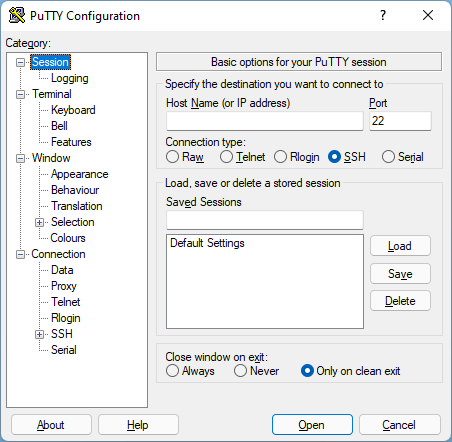
You can also install the SSH client on your host machine to access the remote SSH server (In this case, Kali Linux).
