
What are Clients and Servers?
To better understand the differences between Linux and Windows, let us first see what a server is and what it does. A Server is a device or a computer program That provides various services to its clients.
Clients also can be a computer program or a device that sends requests to the server to get service. Service usually is a functionality of the server. Servers accept requests for specific functionality from clients and respond to them.
By this definition, servers need two software components: Server operating system and service application. Service applications run on an operating system platform. Task scheduling and memory management are the most critical tasks of an operating system. Therefore Choosing a suitable operating system has a significant impact on service efficiency.
There are several operating systems available to choose. Windows dominated over 75.7% of the desktops market, but Linux distributions always take the lead for servers and supercomputers. However, the best choice depends upon the requirements of the user.
Windows Architecture
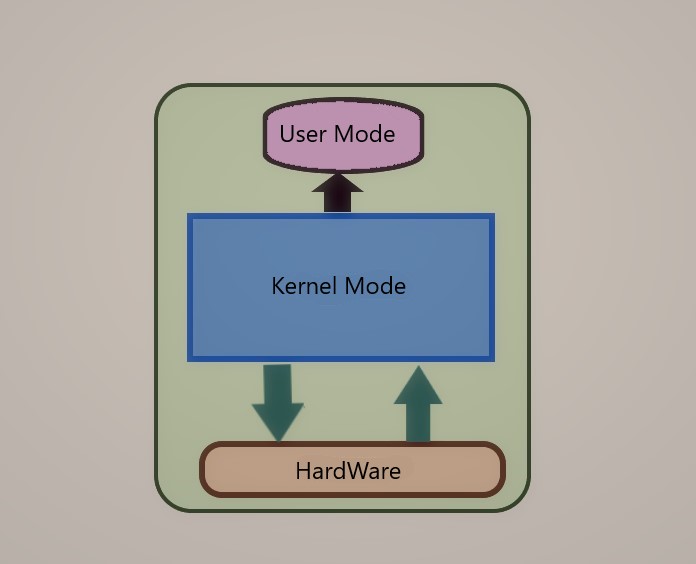
Architecture in Windows has two main parts: User mode and Kernel mode
User mode has two subsystems: the integral subsystem and the Environment. The Integral subsystem is responsible for system support and service and security and application processes such as user access management and task scheduler. The Environment subsystem is the connection between OS Kernel and User mode applications such as win32 and POSIX.
Kernel mode has direct access to the computer resources and hardware; therefore, windows can interact with hardware devices through kernel mode device drivers. Kernel mode consists of 4 subsystems: Executive Services, Kernel Mode Drivers, Microkernel, and hardware Abstract Layer (HAL). Memory Management, i/o Management, thread Management, networking, and many others are Kernel mode Layer tasks.
Linux Architecture
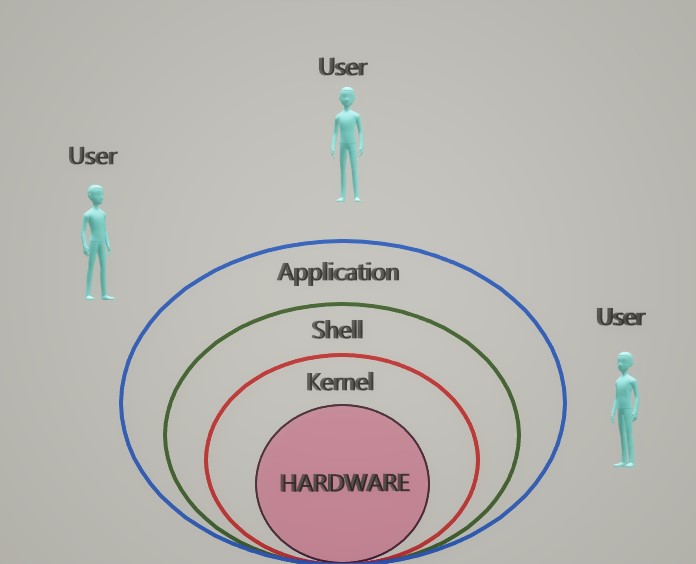
Linux Architecture also has four layers: The Hardware Layer, which consists of every type of hardware attached to the system.
Linux Kernel is the main layer, which handles connections between the hardware layer and their processes. The kernel is responsible for system calls and security, process management, device drivers, and memory management.
We can Define Shell or System Call Interface as an interface between user and kernel, a command interpreter that gets commands from the user and runs functions on the kernel and displays output .today there are two kinds of shells, command line and Graphical shell.
Licensing
Linux is an open source operating system. Hence most of the applications, utilities, and libraries are free. Also, users have access to source code and re-generate them.
Windows comes with the Microsoft License, and no modification is available due to not having access to source codes.
Security
Windows is not open source; therefore, users do not have access to its source code. If users discover any vulnerability, they have to report it and wait for a solution. On the other hand, Linux users have access to the source code because of being an Open source operating system. If any vulnerability occurs, they can investigate, detect, and fix the issue themselves. Above all, there is a vast Linux community to help them out.
Linux also has a compelling feature called Iptables, which in addition to applying filters in port and protocol and IP addresses and type of traffic levels, allows users to write scripts to enforce customized rules.
In Linux, every user has its home directory and only has limited access to limited parts, so when a virus attack happens, only some part of the system will damage. Moreover, other parts will work fine. On the other hand, in windows, the access control mechanism is UAC which controls access privileges but is not decisive as in Linux.
Update
Updates in windows are random and happen at this very moment which may be inconvenient. Also, update installation requires a system reboot which is not proper for services, and it takes time to install updates.
On the other hand, in Linux, the user decides when to update and what to install, it is so faster, and no reboot is required.
Installation
The installation process in windows has a very smooth and easy setup. Even though the installation process takes more time than Linux installation, very few user inputs are required. Linux installation is complicated and needs many user inputs, but faster in the installation process.
Ease of use
Due to the powerful, user friendly, and complete windows graphical user interface, using windows is so easy even for beginners.
But Linux mostly is used by technical and expert users because you have to be familiar with commands and syntaxes to interact with Linux. It also makes troubleshooting Linux harder than windows.
Speed
When it comes to speed, Linux easily wins. Linux is lightweight and fast in the boot and places Files in chunks, making them close to each other. Linux does not use Defragmentation anymore, and the use of the EXT4 file system makes the system more efficient and fast.
Windows is slower in the boot because programs run in the background and eat up resources. Therefore system ram and disk usage congestions are regular and expected in windows, especially when massive or multiple processes are running.
How to Choose?
Choosing an operating system for a service depends on a company’s kind of service and knowledge of users and resources.
As the statistics show, Windows servers are famous for handling services such as active directory, Email services ( such as Exchange) and, Linux servers mainly are used for Web services and databases.
So if you decide to improve your Linux knowledge, Follow us to the following posts.

2 Comment